
The Best Printers for Notary Signing Agents: 2026 Buyer's Guide
Updated: Jul 22
Reviewed & Updated 07/2026
Looking for the best printer for your notary business? Compare the top dual tray laser printers for Notary Signing Agents, mobile notaries, and home offices in our updated 2026 buyer's guide.

Why Your Printer Matters
Before you purchase a printer, it's important to understand that not every office printer is designed for the demands of a Notary Signing Agent.
Unlike the average home office, notaries routinely print large loan packages that often exceed 150 pages. Many of these documents contain a mix of letter- and legal-size paper, and title companies expect them to be printed exactly as provided. A slow printer, frequent paper jams, or the need to manually swap paper sizes can quickly turn a simple signing into a frustrating experience.
Choosing the right printer isn't just about convenience; it's an investment in your business. A reliable printer can save hours of work each week, reduce printing errors, lower operating costs, and present a more professional image to your clients.
Whether you're just starting your notary business or replacing an older machine, selecting the right printer can make every signing appointment more efficient.
Why Every Notary Needs a Dual Tray Laser Printer
If there's one recommendation we consistently make at Notary Stars, it's to invest in a dual tray laser printer.
Loan packages almost always contain both letter-size (8.5" x 11") and legal-size (8.5" x14") documents. A dual tray printer automatically selects the correct paper size for each page without requiring you to stop printing and manually change paper.
Benefits include:
✔ Faster printing
✔ Fewer mistakes
✔ Professional document preparation
✔ Less wear on the printer
✔ Time savings
Although many new notaries try to save money by purchasing a single-tray printer, most eventually upgrade after realizing how much time they spend switching paper back and forth. If your goal is to complete loan signings efficiently, a dual tray printer is one of the best investments you can make.
Laser vs. Inkjet
One of the most common questions we receive is whether a notary should purchase a laser printer or an inkjet printer.
For Notary Signing Agents, our recommendation is simple: Choose a laser printer.
Laser Printers
Ideal for:
High-volume printing
Loan packages
Fast printing
Long-term reliability
Advantages:
Toner doesn't dry out
Faster print speeds
Lower cost per printed page
Better for large document packages
Handles heavy workloads
Inkjet Printers
Ideal for:
Occasional printing
Photos
Small home office use
Disadvantages:
Ink can dry out
Ink can fade overtime
Slower print speeds
Higher long-term ink costs
More frequent cartridge replacements
While inkjet printers have improved over the years, Loan Signing Agents are asked to use laser printers. Documents printed with a laser printer last longer than those printed with an inkjet printer, especially when it comes to resistance to moisture, fading, and handling.
Features That Matter
When shopping for a printer, don't get distracted by flashy features you'll rarely use.
Instead, look for the features that actually improve your workflow.
Dual Paper Trays
Automatically switches between legal and letter paper.
Automatic Duplex Printing
Prints on both sides of the paper without manually flipping pages.
Fast Print Speeds
Look for approximately 40 pages per minute or faster.
Wireless Printing
Allows printing from multiple computers and mobile devices.
Large Toner Capacity
Reduces how often you need to replace toner.
Reliable Paper Handling
Large loan packages require dependable paper feeding to avoid jams.
Expandable Paper Capacity
Some printers allow additional paper trays to be added as your business grows.
Printer Recommendation

Overview
A high-volume monochrome laser printer designed for businesses that demand speed, reliability, and efficiency. With two included paper trays, automatic duplex printing, and fast print speeds, it's an excellent choice for Notary Signing Agents who regularly print large loan packages. It focuses on one thing, printing, and does it exceptionally well.
Best For
✔ High-volume Loan Signing Agents
✔ Experienced Notaries
✔ Home offices
✔ Printing multiple loan packages daily
✔ Offices that already own a separate scanner
Pros
Dual trays
Fast printing
Automatic duplex printing
Large paper capacity
Reliable wireless, Ethernet, and USB connectivity
Cons
Larger footprint
No color printing
Our Opinion
If you already own a quality scanner or prefer dedicated devices, this is one of the best print-only options available. Its speed, paper capacity, and reliability make it a strong investment for busy Signing Agents who print multiple loan packages every day.
Things to Consider
If you still need scanning and copying capabilities, an all-in-one model may offer better overall value. However, for high-volume printing, a dedicated printer like this often delivers better long-term performance.

Overview
This printer remains one of the most trusted all-in-one laser printers for Notary Signing Agents. Combining fast printing, scanning, copying, and faxing into one dependable machine, it offers an excellent balance of features, reliability, and value for both new and experienced notaries.
Best For
✔ New Notaries
✔ Experienced Signing Agents
✔ Home offices
✔ Moderate to high printing volume
Pros
Print, scan, copy, and fax
Automatic duplex printing
Automatic document feeder
Fast print speeds
Reliable wireless networking
Excellent long-term value
Cons
Only one paper tray included
Additional tray purchased separately
Larger than basic home printers
Our Opinion
This continues to be one of our favorite recommendations because it offers nearly everything a Notary Signing Agent needs in one machine. If you're only purchasing one office printer, this is one of the strongest values on the market.
Things to Consider
We strongly recommend adding a second paper tray if you regularly print loan packages. Having dedicated trays for letter and legal paper dramatically improves workflow and reduces printing errors.
Mobile Office Printer

Overview
A compact monochrome laser printer that delivers fast, dependable printing in a small footprint. Perfect as a mobile printer, it offers wireless connectivity, automatic duplex printing, and sharp black-and-white output. While it isn't designed specifically for high-volume loan signing work, it's an excellent option for general notary documents, office paperwork, and notaries who are just getting started.
Best For
✔ New Notaries
✔ Experienced Signing Agents
✔ Mobile offices
✔ Budget-conscious buyers
✔ Low to moderate printing volume
Pros
Affordable price point
Compact design that fits small workspaces
Fast print speeds
Automatic duplex (two-sided) printing
Cons
Single paper tray only
No built-in scanner or copier
Manual paper changes required for mixed letter- and legal-size documents
Our Opinion
A dependable entry-level laser printer that offers excellent value for new mobile notaries. If your business primarily focuses on acknowledgments, jurats, affidavits, estate planning documents, and other everyday notarizations, this printer will serve you well.
Things to Consider
Before purchasing, consider the type of notarizations you expect to perform. If your goal is to complete mortgage loan signings on a regular basis, investing in a dual-tray laser printer from the beginning may save you time and money in the long run.
Toner Recommendation
One of the biggest ongoing expenses is toner.
While genuine manufacturer toner often provides the best reliability, many experienced notaries successfully use reputable third-party toner to reduce operating costs.
When purchasing toner:
Buy from reputable sellers.
Keep an extra cartridge on hand.
Replace toner before completely empty.
Compare cost per page, not just cartridge price.
Printer Drums
Many new notaries don't realize toner cartridges and printer drums are often separate components. The toner supplies the printing material, while the drum transfers that toner onto the paper.
Depending on your printer model, drums typically last significantly longer than toner cartridges, but they eventually require replacement.
Understanding the difference can help you troubleshoot print quality issues and avoid replacing the wrong component.
While genuine manufacturer supplies are always an option, many high-quality third-party toner and drum units perform exceptionally well. Purchasing from a trusted supplier helps ensure reliable results, consistent print quality, and long-term value. Poor-quality aftermarket supplies, however, can affect printer performance and may not be covered under your printer's warranty if they cause damage.
We recommend V4INK on Amazon for toner and drums.
Additional Paper Trays
As your business grows, you may want to add another paper tray.

Overview
This lower paper tray is one of the best upgrades you can make to compatible Brother printers. Adding a dedicated second paper tray allows you to keep letter and legal paper loaded at all times, eliminating the need to manually swap paper sizes between print jobs.
Best For
✔ Loan Signing Agents
✔ Compatible Brother Printers
Pros
Dedicated tray for legal-size paper
Reduces interruptions
Saves time
Helps prevent printing mistakes
Increases total paper capacity
Cons
None
Our Opinion
If your Brother printer supports the LT5500, we consider this accessory one of the best upgrades you can purchase. Most experienced Notary Signing Agents quickly discover that having dedicated paper trays significantly improves workflow and efficiency.
Things to Consider
Before purchasing, verify that your printer model is compatible with the LT5500 paper tray. Not every Brother printer accepts this accessory.
Portable Power Stations
If you work remotely or travel frequently, a portable power station can keep your laptop, scanner, and other essential equipment running during power outages or while working from your vehicle.
While not necessary for every notary, it can provide peace of mind for those who frequently work on the road or in areas with unreliable power.
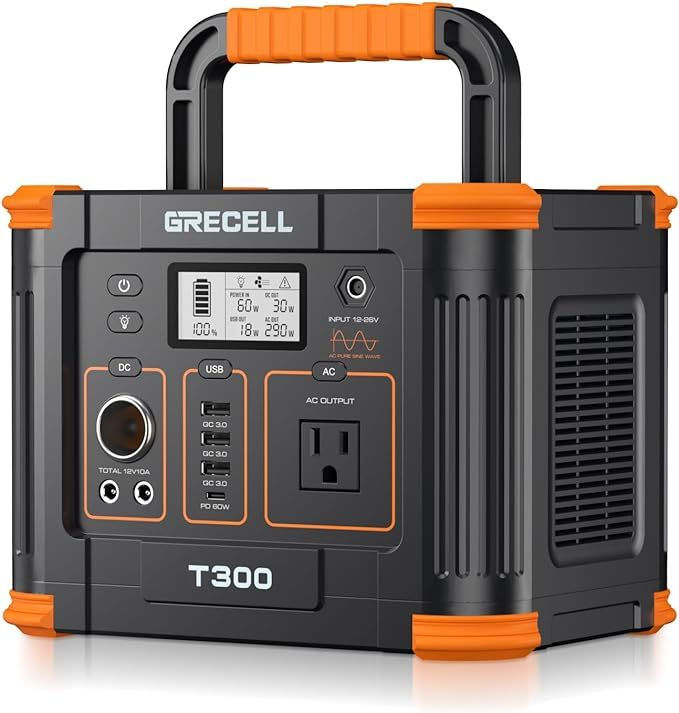
Overview
A lightweight, rechargeable backup battery that keeps your essential office equipment powered wherever your notary business takes you. It's ideal for charging laptops, scanners, phones, tablets, and other small electronics while traveling, working from your vehicle, or during unexpected power outages.
Best For
✔ Loan Signing Agents
✔ Mobile Notaries
✔ Working from your vehicle
✔ Emergency backup power
✔ Charging laptops, scanners, tablets, and phone
Pros
Lightweight and portable
Pure sine wave AC outlet
Multiple charging ports, including USB-C PD
Quiet operation
Rechargeable via wall outlet, vehicle, or solar panel
Excellent value for the price
Cons
Cannot power full-size laser printers for extended periods
Limited runtime depending on connected devices
Solar panel sold separately
Our Opinion
The GRECELL 330W is an affordable and dependable backup power solution for mobile notaries. It's perfect for keeping your essential devices charged throughout the day and provides peace of mind during travel or unexpected power outages.
Things to Consider
This power station is ideal for laptops, scanners, phones, tablets, and hotspots. If you need to power a full-size laser printer, you'll want a larger-capacity power station with a higher wattage output.
Page Separators
A page separator program is used for splitting large scan-back packages before printing.
We recommend:
Adobe Acrobat Pro (check out this video and walkthrough on how to utilize Adobe Acrobat Pro as a page separator.)
Frequently Asked Questions
Do I really need dual trays?
If you regularly print loan packages containing both letter- and legal-size paper, dual trays will save significant time and reduce mistakes.
Can I use an all-in-one printer?
Absolutely. Many all-in-one laser printers offer excellent printing and scanning capabilities, making them a practical choice for many notaries.
How long does toner last?
This varies by model and print volume, but toner typically lasts much longer than ink cartridges and provides a lower cost per printed page.
Check out this video from notaries around the country and how they set up their equipment.
Looking for the Best Scanner?
A great printer is only half of an efficient notary office.
Be sure to read our companion guide:
Sources & References
The recommendations in this guide are based on a combination of hands-on experience, manufacturer specifications, independent product testing, and industry best practices.
Brother USA – https://www.brother-usa.com
RTINGS – https://www.rtings.com/printer
Signing Professionals Workgroup (SPW) – https://signingprofessionalsworkgroup.org
Notary Stars Team & Community
Written by Notary Stars for Notary Stars
Originally Published: 03/31/2023

Are You Subscribed?
Don't Miss Important Emails About the Notary Community.
Subscribe to the Notary Stars Newsletter Today!


Comments