
The Best Scanners for Notary Signing Agents: 2026 Buyer's Guide
Updated: Jul 22
Reviewed & Updated 07/2026
Looking for the best scanner for your notary business? Compare the top document scanners for Notary Signing Agents, including automatic document feeder, wireless, and budget-friendly options.

Why Your Scanner Matters
For many Notary Signing Agents, a scanner is just as important as a printer. While your printer prepares loan documents before the appointment, your scanner often determines how quickly you can return completed documents to the hiring company.
Many title companies and signing services require scanbacks, which means you'll need to scan and upload the completed loan package before shipping the originals. A reliable scanner can save valuable time, reduce frustration, and help you meet tight funding deadlines.
Whether you're scanning a few pages for a correction or uploading an entire loan package, investing in the right scanner can improve efficiency, professionalism, and your overall workflow.
Why Every Notary Needs an Automatic Document Feeder (ADF)
If you regularly perform loan signings, the single most important feature to look for in a scanner is an Automatic Document Feeder (ADF).
An ADF allows you to load an entire stack of documents into the scanner instead of placing each page on the glass one at a time. This dramatically speeds up scanbacks and makes handling large loan packages much more efficient.
Benefits include:
✔ Faster scanbacks
✔ Reduced scanning time
✔ More professional workflow
✔ Better document organization
If you're purchasing your first scanner, make a scanner with an automatic document feeder (ADF) one of your top priorities.
Why Duplex Scanning Is Still Worth Having
While most loan documents are printed single-sided, duplex scanning provides an extra level of convenience and security.
A duplex scanner automatically captures both sides of every sheet in a single pass. This helps ensure you don't accidentally miss information on documents that contain printing on the reverse side, such as identification documents, powers of attorney, or other supporting paperwork.
For many notaries, duplex scanning isn't used because every page has printing on both sides—it's valuable because it removes the need to stop and check.
Dedicated Scanner vs. All-in-One Printer
Many all-in-one printers include a built-in scanner, but that doesn't always make them the best choice for a busy notary business.
Dedicated Scanner
Ideal for:
Frequent scanbacks
Large loan packages
Faster workflow
Better portability
Mobile office
Advantages:
Faster scanning
Better document feeding
Compact desktop footprint
Easier to transport
Built specifically for document scanning
All-in-One Printer Scanner
Ideal for:
Occasional scanning
General office use
Limited office space
Disadvantages:
One machine for multiple tasks
Lower initial cost
Good for light scanning
For most Loan Signing Agents, a dedicated document scanner becomes one of the most valuable tools in their office.
Features That Matter
When choosing a scanner, look for features that improve your daily workflow rather than extras you'll rarely use.
Automatic Document Feeder (ADF)
Allows multiple pages to be scanned automatically without manual feeding.
Scan Speed
Faster scanners reduce the time spent completing scanbacks.
Wireless Connectivity
Convenient if you work from multiple computers or mobile devices.
Compact Design
Perfect for small offices or mobile notaries.
Reliable Paper Handling
Prevents paper jams and misfeeds when scanning large loan packages.
Duplex Scanning
Scans both sides of each page simultaneously.
Scanner Recommendation

Overview
The Epson ES-400 II offers many of the same scanning capabilities as its wireless sibling while using a direct USB connection. It provides fast duplex scanning, dependable document feeding, and high-quality image capture, making it a dependable scanner for everyday notary work.
Best For
✔ New Notaries
✔ Budget-conscious buyers
✔ Home offices
✔ Frequent scanbacks
✔ USB-connected workstations
Pros
Excellent scan quality
Reliable automatic document feeder
Duplex scanning
Lower cost than wireless models
Easy setup
Compact footprint
Cons
No wireless connectivity
USB connection required
Our Opinion
If you don't need wireless scanning, the ES-400 II offers outstanding value. It provides nearly identical scanning performance to the ES-500W II while saving money, making it one of the best scanner values for new and growing Notary Signing Agents.
Things to Consider
Choose this model if you primarily scan from one dedicated workstation. If you want the flexibility to scan from multiple devices without cables, the ES-500W II may be worth the additional investment.

Overview
One of the most popular wireless document scanners available. It delivers fast duplex scanning, wireless connectivity, and an intuitive scanning experience, making it well-suited for Notary Signing Agents who frequently complete scanbacks or work from multiple computers. Community feedback consistently highlights its solid build quality and mature scanning software.
Best For
✔ Wireless home offices
✔ Experienced Signing Agents
✔ Frequent scanbacks
Pros
Wireless connectivity
Reliable automatic document feeder
Duplex scanning
Excellent image quality
Fast scanning speeds
User-friendly software
Cons
Slightly more expensive than wired models
Replacement rollers require periodic maintenance
Our Opinion
The ES-500W II has earned an excellent reputation for reliability and ease of use. If wireless scanning is important to your workflow, this scanner deserves serious consideration and remains one of Epson's strongest offerings.
Things to Consider
Wireless setup adds flexibility but also introduces another device to manage on your network. If you always scan from the same computer, a wired model may provide the same performance at a lower cost.
Vehicle Power Inverter

Overview
The 3000-Watt Power Inverter converts your vehicle's 12V battery power into standard 110V household power, allowing you to operate or charge office equipment while on the road. With dual AC outlets, USB ports, an LED display, and built-in cooling fans, it's a dependable solution for Mobile Notaries who work from their vehicle or need backup power during travel.
Best For
✔ Mobile Notaries
✔ Loan Signing Agents
✔ Working from your vehicle
✔ Emergency backup power
✔ Charging laptops, scanners, printers, and other office equipment
Pros
High 3,000-watt power output
Dual AC outlets and USB charging ports
LED display for monitoring power usage
Built-in cooling fans
Includes battery cables
Great for powering multiple devices
Cons
Requires direct connection to a vehicle battery
Larger than compact plug-in inverters
Can drain a vehicle battery if used with the engine off
Our Opinion
If you spend a lot of time working from your vehicle, this inverter provides reliable power for laptops, scanners, and other essential office equipment. Its higher wattage offers more flexibility than smaller inverters, making it a practical addition to a mobile notary setup.
Things to Consider
Always verify the power requirements of your equipment before use. For extended operation or when a vehicle isn't available, a portable power station may be the better option.
Portable Power Station
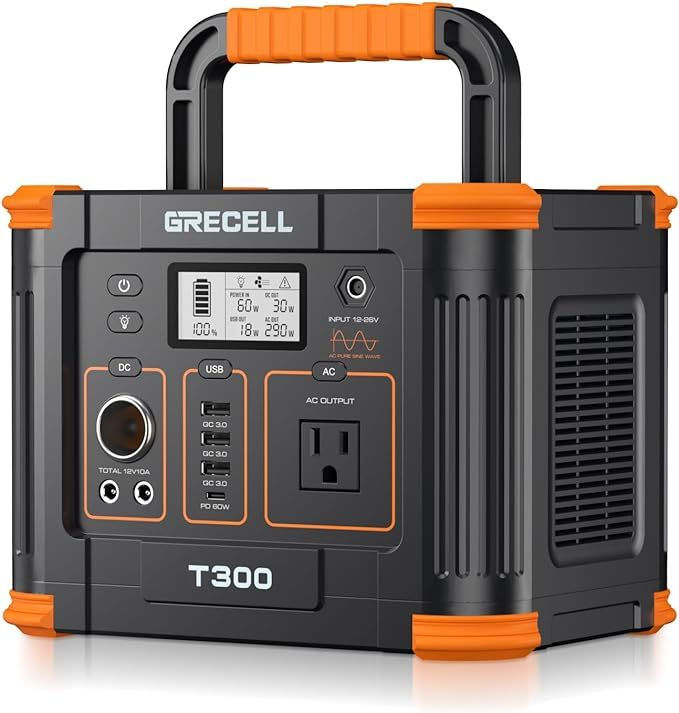
If you work remotely or travel frequently, a portable power station can keep your laptop, scanner, and other essential equipment running during power outages or while working from your vehicle.
It may not be necessary for every notary; it can provide peace of mind for those who frequently work on the road or in areas with unreliable power.
Overview
A lightweight, rechargeable backup battery that keeps your essential office equipment powered wherever your notary business takes you. It's ideal for charging laptops, scanners, phones, tablets, and other small electronics while traveling, working from your vehicle, or during unexpected power outages.
Best For
✔ Loan Signing Agents
✔ Mobile Notaries
✔ Working from your vehicle
✔ Emergency backup power
✔ Charging laptops, scanners, tablets, and phone
Pros
Lightweight and portable
Pure sine wave AC outlet
Multiple charging ports, including USB-C PD
Quiet operation
Rechargeable via wall outlet, vehicle, or solar panel
Excellent value for the price
Cons
Cannot power full-size laser printers for extended periods
Limited runtime depending on connected devices
Solar panel sold separately
Our Opinion
The GRECELL 330W is an affordable and dependable backup power solution for mobile notaries. It's perfect for keeping your essential devices charged throughout the day and provides peace of mind during travel or unexpected power outages.
Things to Consider
This power station is ideal for laptops, scanners, phones, tablets, and hotspots. If you need to power a full-size laser printer, you'll want a larger-capacity power station with a higher wattage output.
Frequently Asked Questions
Can I use my phone to scan documents?
No, they aren't practical for large loan packages or professional scanbacks. Also, when scanned using your phone you run the risks of documents containing personal private information being sent to the cloud.
Do I really need a dedicated scanner?
If you're performing loan signings regularly, a dedicated document scanner can save significant time and improve efficiency.
Should I buy wireless or USB?
Wireless scanners provide more flexibility, while USB-connected scanners often cost less and work well for dedicated home offices.
How many pages should the automatic document feeder hold?
For most notaries, a 20–50 page feeder is sufficient, especially since pages can be added as scanning progresses. Larger ADF capacities are helpful for high-volume users.
Looking for the Best Printer?
A great scanner works best when paired with a reliable laser printer.
Be sure to read our companion guide:
Sources & References
The recommendations in this guide are based on a combination of hands-on experience, manufacturer specifications, independent product testing, and industry best practices.
Epson – https://www.epson.com
Signing Professionals Workgroup (SPW) – https://signingprofessionalsworkgroup.org
Notary Stars Team & Community
Written by Notary Stars for Notary Stars
Originally Published: 03/31/2023

Are You Subscribed?
Don't Miss Important Emails About the Notary Community.
Subscribe to the Notary Stars Newsletter Today!


Comments